
TL;DR: In Pipedream's Node.js or Python steps, change the OpenAI
baseURLtohttps://tokonomics.ca/proxy/openaiand swap your API key for a Tokonomics key. Every AI call is metered. Setup: 2 lines of code.
Key Takeaways
- Pipedream shows executions and credits, not AI token costs — your AI spend often exceeds your Pipedream subscription by 5–10x
- 82% of enterprises cite cloud cost management as their top challenge (Flexera, 2025)
- Setup: 2 lines of code — change
baseURLand API key in your Node.js or Python step- Inference costs represent 20–40% of total revenue for AI-powered products (a16z, 2023)
Why Do Pipedream AI Workflows Need Cost Tracking?
Pipedream is a developer-first automation platform, where you write real code (Node.js or Python) in each step. This means you have full control over your OpenAI integration, but also full responsibility for tracking what it costs. Gartner predicts that by 2025, AI-augmented development will account for over 75% of new business applications, making cost visibility critical for every automation workflow.
Pipedream's dashboard shows executions and credits. It does not show that your "enrich-lead" workflow consumed $180 in GPT-4o tokens last month, or that your system prompt is 3,000 tokens of mostly unnecessary instructions. According to the Flexera 2025 State of the Cloud Report, 82% of enterprises cite cloud cost management as their top challenge — and AI API token spend is the fastest-growing unmanaged cost category within that group.
For developers running AI workflows at scale, the AI token cost often exceeds the Pipedream subscription cost by 5-10x. A16z's analysis of AI application economics (2023) found that inference costs represent the largest variable expense for AI-powered products, often 20-40% of total revenue. Yet there's no built-in way to see it.
How Do You Set It Up in 2 Lines of Code?
Since Pipedream runs real code, the integration is the simplest of any automation platform. In a Node.js step:
import OpenAI from "openai";

const client = new OpenAI({
  apiKey: "mk_your_tokonomics_key",
  baseURL: "https://tokonomics.ca/proxy/openai"
});

const response = await client.chat.completions.create({
  model: "gpt-4o-mini",
  messages: [
    { role: "user", content: steps.trigger.event.body.text }
  ]
});

return response.choices[0].message.content;
The only changes from a normal OpenAI call: apiKey and baseURL. Everything else — the SDK, the methods, the response format — is identical.
Python Step
from openai import OpenAI

client = OpenAI(
    api_key="mk_your_tokonomics_key",
    base_url="https://tokonomics.ca/proxy/openai"
)

response = client.chat.completions.create(
    model="gpt-4o-mini",
    messages=[
        {"role": "user", "content": steps["trigger"]["event"]["body"]["text"]}
    ]
)

return {"result": response.choices[0].message.content}
How Do You Add Cost Tags to Workflows?
Pass custom headers for per-workflow cost attribution:
const response = await client.chat.completions.create({
  model: "gpt-4o-mini",
  messages: [{ role: "user", content: inputText }]
}, {
  headers: {
    "X-Feature-Name": "lead-enrichment",
    "X-Metering-Tags": JSON.stringify({
      workflow: "lead-enrichment",
      source: steps.trigger.event.source || "unknown",
      env: "production"
    })
  }
});
These headers are stripped before reaching OpenAI. In the Tokonomics dashboard, you can group costs by workflow, source, or any custom dimension. McKinsey's State of AI 2024 found that organizations with per-use-case AI cost attribution are twice as likely to achieve strong ROI from their AI deployments compared to those tracking only aggregate spend.
How Do You Use Anthropic / Claude in Pipedream?
const response = await fetch("https://tokonomics.ca/proxy/anthropic/messages", {
  method: "POST",
  headers: {
    "Authorization": `Bearer mk_your_tokonomics_key`,
    "Content-Type": "application/json",
    "X-Feature-Name": "document-analysis"
  },
  body: JSON.stringify({
    model: "claude-sonnet-4-6",
    max_tokens: 1024,
    messages: [{ role: "user", content: steps.trigger.event.body.text }]
  })
});

return await response.json();
Same pattern for DeepSeek (/proxy/deepseek/chat/completions), Gemini, Mistral, and all supported providers.
How Do You Configure Environment Variables?
Store your Tokonomics key securely in Pipedream's environment variables:
- Go to Settings → Environment Variables
- Add
TOKONOMICS_API_KEY=mk_your_key - Reference it in steps:
const client = new OpenAI({
  apiKey: process.env.TOKONOMICS_API_KEY,
  baseURL: "https://tokonomics.ca/proxy/openai"
});
This keeps your key out of the workflow code and makes it easy to rotate.
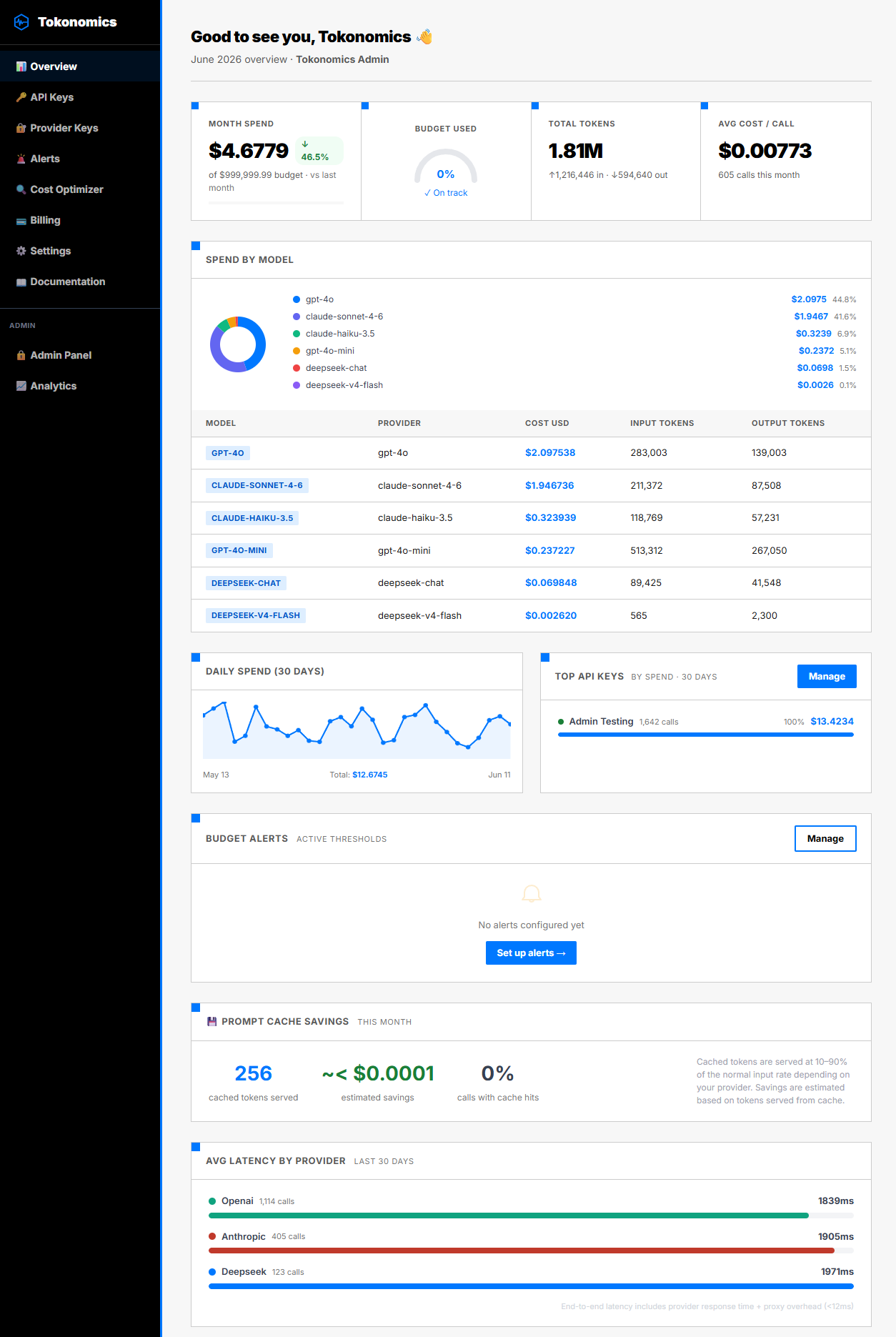
What Shows Up in the Dashboard?
After connecting:
- Cost per workflow (via X-Feature-Name tags)
- Model breakdown — which workflows use expensive vs cheap models
- Daily spend trend — is cost growing with usage?
- Token efficiency — input/output ratio per workflow
- Budget alerts — Slack, email, or webhook at configurable thresholds
What Do Common Pipedream AI Patterns Cost?
| Pattern | Model | Calls/mo | Est. cost/mo |
|---|---|---|---|
| Webhook → classify → route | GPT-4o-mini | 10,000 | $1.50 |
| RSS → summarize → Slack | GPT-4o-mini | 3,000 | $1.80 |
| Email → extract entities → CRM | GPT-4o | 5,000 | $25-50 |
| Webhook → AI agent → multi-tool | GPT-4o | 2,000 | $40-100 |
The entity extraction and agent patterns are 10-50x more expensive than simple classification. BCG's 2024 AI at Scale report found that companies achieving ROI from AI consistently track costs at the use-case level. Without cost tracking, you'd never know which workflow to optimize first.
Frequently Asked Questions
Can I use Pipedream's built-in OpenAI integration with the proxy?
Pipedream's pre-built OpenAI actions don't support custom base URLs. Use a Code step (Node.js or Python) instead — you get full control over the SDK configuration, and the setup is just 2 extra lines.
Does this work with Pipedream's free tier?
Yes. Pipedream's free tier includes 100 daily invocations. On the Tokonomics side, the Free plan includes 100 API calls/month.
What about streaming responses in Pipedream?
For webhook-triggered workflows, streaming usually isn't needed — you process the full response and pass it to the next step. But if you need streaming (e.g., SSE to a client), the Tokonomics proxy supports it fully.
Can I track Pipedream + other platforms in one dashboard?
Yes. All calls through the proxy — from Pipedream, n8n, Zapier, or custom code — appear in the same dashboard.
Get Started
- Create a free Tokonomics account
- Add your API key to Pipedream environment variables
- Change
baseURLin your OpenAI step — 2 lines of code - Add
X-Feature-Namefor per-workflow tracking - Check the dashboard after the first run
All sources retrieved June 2026. Pricing: GPT-4o at $2.50/1M input tokens (OpenAI Pricing), GPT-4o-mini at $0.15/1M input tokens. Key external sources: Gartner GenAI Predictions 2024 | A16z Generative AI Platform Analysis 2023 | Flexera 2025 State of the Cloud | McKinsey State of AI 2024 | BCG AI at Scale 2024.