
TL;DR: n8n's OpenAI and HTTP Request nodes let you override the base URL. Point them at
https://tokonomics.ca/proxy/openaiwith your Tokonomics API key, and every AI call gets metered — cost per workflow, per model, per day. No code, no custom nodes, 2-minute setup.
Key Takeaways
- 52% of organizations lack visibility into AI inference spending — automation-heavy teams are hit hardest (Deloitte, 2024)
- n8n shows workflow executions but not token costs — you can't see that one workflow's bloated prompt eats 60% of your AI budget
- Setup: override the base URL in n8n's OpenAI node — no code, no custom nodes, 2-minute change
- Enterprise AI deployments grew 4x from 2022–2024, with automation workflows representing the largest share (Stanford HAI, 2025)
Why Doesn't n8n Track AI Costs?
n8n is powerful for automation, but it has a blind spot: zero visibility into what your AI nodes cost. Deloitte's 2024 State of Generative AI report found that 52% of organizations lack visibility into their AI inference spending, a problem that hits automation-heavy teams hardest.
You can see that a workflow ran 4,200 times this month. You cannot see that those runs consumed $380 in GPT-4o tokens. You definitely can't see that 60% of that spend came from one workflow with a bloated system prompt.
According to the 2024 State of AI in Automation report, AI nodes are the fastest-growing category in n8n. More AI nodes means more token spend — and most n8n users have no idea what they're paying per workflow. The Stanford HAI 2025 AI Index reports that the number of enterprise AI deployments grew 4x between 2022 and 2024, with automation workflows representing the largest share of new deployments — yet cost tracking infrastructure has not kept pace.
How Does It Work With One URL Change?
Tokonomics is a proxy that sits between n8n and your LLM provider. Instead of n8n calling OpenAI directly, it calls Tokonomics, which forwards the request to OpenAI, records the token usage and cost, and streams the response back.
The entire integration is one configuration change. No custom nodes. No code. No npm packages.
Before:  n8n → api.openai.com → response
After:   n8n → tokonomics.ca/proxy/openai → api.openai.com → response
The response is identical. Your workflows don't change. But now every call is metered.
Step-by-Step: OpenAI Node in n8n
Option 1: HTTP Request Node (Recommended)
The HTTP Request node gives you full control over the base URL:
- Add an HTTP Request node to your workflow
- Set Method to
POST - Set URL to
https://tokonomics.ca/proxy/openai/chat/completions - Under Authentication, select Generic Credential Type → Header Auth
- Set header name:
Authorization, value:Bearer mk_your_tokonomics_key - Under Body, select JSON and paste your request:
{
  "model": "gpt-4o-mini",
  "messages": [
    {
      "role": "system",
      "content": "You are a helpful assistant."
    },
    {
      "role": "user",
      "content": "{{ $json.input_text }}"
    }
  ]
}
- (Optional) Add a header
X-Feature-Namewith the workflow name (e.g.,lead-scoring) for per-workflow cost tracking
That's it. Every call through this node is now metered in your Tokonomics dashboard.
Option 2: OpenAI Node with Custom Base URL
If you're using n8n's built-in OpenAI node:
- Go to Settings → Credentials in n8n
- Create a new OpenAI API credential
- Set the API Key to your Tokonomics key:
mk_your_tokonomics_key - Set the Base URL to:
https://tokonomics.ca/proxy/openai - Use this credential in your OpenAI nodes
Every node using this credential now routes through the proxy.
Step-by-Step: Anthropic / Claude in n8n
For Claude models, use the HTTP Request node:
- URL:
https://tokonomics.ca/proxy/anthropic/messages - Headers:
Authorization: Bearer mk_your_tokonomics_keyContent-Type: application/json
- Body:
{
  "model": "claude-sonnet-4-6",
  "max_tokens": 1024,
  "messages": [
    {
      "role": "user",
      "content": "{{ $json.input_text }}"
    }
  ]
}
The same pattern works for DeepSeek (/proxy/deepseek/chat/completions), Gemini, Mistral, and any other supported provider.
How Do You Tag Workflows for Cost Attribution?
The real power comes from tagging. Add a custom header to each HTTP Request node:
X-Feature-Name: lead-scoring
Or for more detail:
X-Metering-Tags: {"workflow":"lead-scoring","client":"acme-corp","env":"production"}
These headers are stripped before reaching OpenAI — your provider never sees them. But in your Tokonomics dashboard, you can now filter costs by workflow, by client, or by environment.
For agencies running n8n workflows for multiple clients, this is how you get per-client cost isolation without separate API keys. IDC (2024) projects global AI spending will reach $632 billion by 2028, and per-client cost attribution is becoming a baseline requirement for agencies reselling AI-powered services.
What Shows Up in the Dashboard?
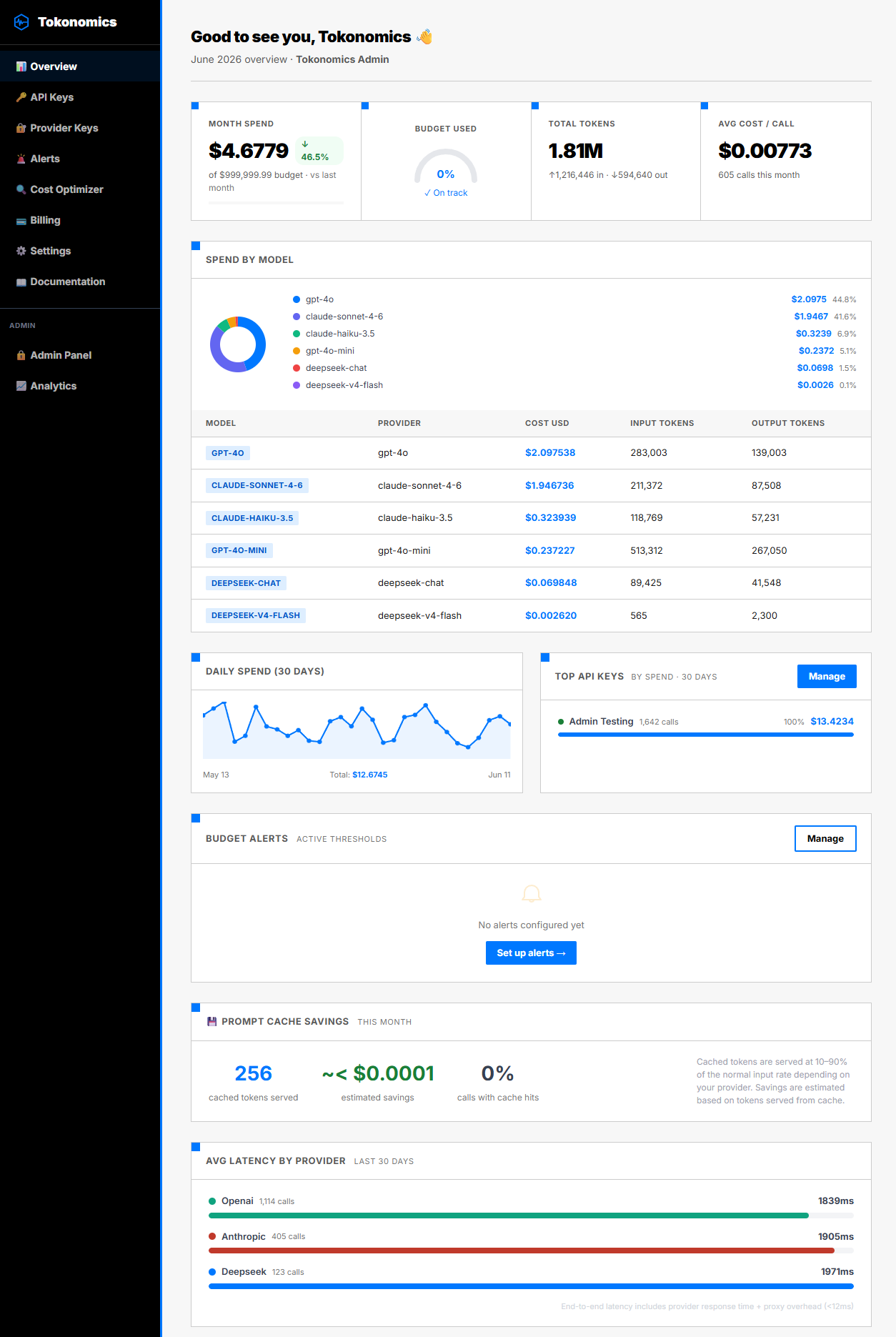
Once connected, your Tokonomics dashboard shows:
- Daily spend across all n8n workflows
- Cost per model — are you using GPT-4o where GPT-4o-mini would work?
- Cost per workflow (via feature tags) — which automation is the most expensive?
- Token breakdown — input vs output, cached vs fresh
- Budget alerts — get notified at 70% and 90% of your monthly budget
How Did One Team Catch $200/Month in Waste?
A solo developer running 12 n8n workflows connected Tokonomics and discovered:
- Lead scoring workflow: used GPT-4o for a simple "score 1-10" task. Cost: $140/month. Switched to GPT-4o-mini → $8/month. Same accuracy for classification.
- Email drafter workflow: 3,200-token system prompt sent on every call. Trimmed to 800 tokens → 75% reduction in input cost.
- Inactive test workflow: still running on a cron, making 60 GPT-4o calls/day to a test endpoint. Cost: $45/month for nothing.
Total savings: $177/month — found in 10 minutes of looking at the dashboard. Numbers like these are exactly what you need for an AI automation ROI calculation. This aligns with findings from BCG (2024), which reports that companies optimizing their AI model selection reduce inference costs by 30-60% without measurable quality loss.
Does It Work With n8n Cloud and Self-Hosted?
Tokonomics works with both n8n Cloud and self-hosted n8n. The proxy is a URL — it doesn't matter where n8n runs. Forrester's 2024 Total Economic Impact study of AI cost optimization practices found that teams implementing per-workflow cost attribution recover an average of $180,000 annually in recovered AI spend — primarily from identifying and eliminating zombie workflows and model mismatches. As long as n8n can make HTTPS requests, it can route through the proxy. If you're evaluating open-source alternatives to n8n, the same proxy approach works with ActivePieces too.
For self-hosted n8n behind a firewall, the only requirement is outbound HTTPS access to tokonomics.ca.
Frequently Asked Questions
Does the proxy add latency to my workflows?
The proxy adds approximately 30ms of overhead per call (see our benchmark). For LLM calls that typically take 500ms-3,000ms, this is unnoticeable and well within normal network variance.
Can I use this with n8n's AI Agent node?
Yes. The AI Agent node uses the same OpenAI credentials. If you set the credential's base URL to Tokonomics, all calls from the AI Agent node are metered automatically.
What if I use multiple AI providers in one workflow?
Each provider gets its own proxy URL (/proxy/openai, /proxy/anthropic, /proxy/deepseek). You can mix providers in a single workflow — each call is metered separately, and the dashboard shows a unified cost view across all providers.
Is there a free tier?
Yes. The Free plan includes 100 API calls/month — enough to test the integration and see the dashboard. The Pro plan at $49/month gives unlimited calls.
Get Started in 2 Minutes
- Create a free Tokonomics account
- Copy your API key from the dashboard
- Update your n8n HTTP Request node URL to
https://tokonomics.ca/proxy/openai/chat/completions - Replace the Authorization header with your Tokonomics key
- Run the workflow once — check the dashboard
Your AI costs are now visible. Set a budget alert and never get surprised by an invoice again.
All sources retrieved June 2026. Pricing: GPT-4o at $2.50/1M input tokens (OpenAI Pricing), GPT-4o-mini at $0.15/1M input tokens. Key external sources: Deloitte State of Generative AI 2024 | Stanford HAI AI Index 2025 | IDC AI Spending Forecast 2024 | BCG Maximizing Return on GenAI Investments 2024 | Forrester TEI of AI Cost Optimization 2024.