
Most developers don't realize how fast LLM bills compound until the invoice arrives. GPT-4o costs $2.50 per million input tokens (OpenAI Pricing, 2025). A single feature calling that model a few thousand times a day adds up faster than a cloud storage bucket left open. This guide gets you from zero to full cost visibility in under five minutes, with no SDK swap and no refactoring.
TL;DR: Tokonomics gets you from zero to full LLM cost visibility in under 5 minutes. Change one URL in your existing code — no SDK, no refactoring. Every API call gets logged with token count, cost, and model. Budget alerts fire before you overspend, not after the monthly invoice arrives.
Key Takeaways
- GPT-4o costs $2.50/1M input tokens and Claude Sonnet 4.5 costs $3/1M input tokens - prices that compound quickly at scale
- Tokonomics works by intercepting your existing API calls - you change one URL, nothing else
- Budget alerts fire before you overspend, not after the monthly invoice arrives
- Feature-level cost tags let you pinpoint exactly which part of your app is burning money
- Setup takes under 5 minutes for any language or HTTP client

Why Does LLM Cost Visibility Matter Now?
Unmonitored LLM spending is one of the fastest-growing line items in engineering budgets. According to a 2024 CloudZero report on cloud cost management, organizations that lack real-time spend alerts overspend their cloud budgets by an average of 23% (CloudZero, 2024). That pattern applies directly to LLM APIs, which behave like cloud compute - elastic, usage-based, and easy to misconfigure.
The pricing varies sharply by model. GPT-4o sits at $2.50 per million input tokens and $10 per million output tokens (OpenAI Pricing, 2025). Claude Sonnet costs $3 per million input tokens and $15 per million output tokens (Anthropic Pricing, 2025). A chatbot generating verbose responses can hit the output ceiling fast. Without a proxy layer recording every call, you're flying blind until the invoice lands.
I built Tokonomics after a $47,000 LLM bill hit our company card in a single month. A support feature had been generating 4,000-token responses when 400 would have been enough. We had no alerting. We had no per-feature attribution. We had no idea until the charge appeared. The fix took 20 minutes once we could see the data - but we had no way to see the data.
Citation Capsule: According to CloudZero's 2024 cloud cost management research, teams without real-time spend alerts overspend their budgets by an average of 23% (CloudZero, 2024). This pattern holds for LLM APIs, which behave as elastic, metered services with no built-in hard caps by default.
How Does Tokonomics Actually Work?
Tokonomics acts as a transparent proxy between your app and the LLM provider. It records every call, counts tokens, calculates cost in real time, and fires alerts when thresholds are crossed. Setup requires exactly one change to your code: swapping the base URL.
No SDK swap. No middleware installation. No schema migration. Your existing request structure, response handling, error handling, and retry logic all continue to work identically. The proxy passes your request upstream and streams the response back to your app, adding one response header: X-Metering-Latency. That's the only observable difference from your app's perspective.
Most cost monitoring tools require you to instrument your code, wrap your client, or install a library. That creates adoption friction. Tokonomics takes the opposite approach: sit in front of the provider, require nothing from the app layer. A team can integrate an entire codebase in the time it takes to deploy a config change.
Citation Capsule: OpenAI's gpt-4o model is priced at $2.50 per million input tokens and $10 per million output tokens (OpenAI Pricing, 2025). Anthropic's Claude Sonnet is priced at $3 per million input tokens and $15 per million output tokens (Anthropic Pricing, 2025). A proxy that records usage at the HTTP layer can attribute these costs to specific features without any application-level instrumentation.
Step 1: Get Your Credentials (1 Minute)
Before you start, create your free account at tokonomics.ca/register. The dashboard gives you two values you'll need.
From your Tokonomics dashboard, copy your Proxy Base URL: https://api.tokonomics.ca/proxy. Then copy your API key - it looks like mk_a3f2e1b9c8d7.... That key is shown once at creation. Store it in your environment variables the same way you'd store an OpenAI key. Never commit it to version control.
Your provider's original API key stays exactly where it is. Tokonomics stores it on the server side and substitutes it on outbound requests. Your OpenAI or Anthropic keys never appear in your frontend code.

Step 2: How Do You Update Your Base URL?
Updating the base URL is the only code change required. The pattern is identical across all languages: point the client at https://api.tokonomics.ca/proxy/{provider} instead of the provider's direct endpoint, and swap your provider API key for your Tokonomics key in the Authorization header.
Ruby (net/http)
require 'net/http'
require 'json'
require 'uri'

uri = URI('https://tokonomics.ca/proxy/openai/chat/completions')
http = Net::HTTP.new(uri.host, uri.port)
http.use_ssl = true

request = Net::HTTP::Post.new(uri)
request['Authorization'] = 'Bearer mk_your_tokonomics_key'
request['Content-Type']  = 'application/json'
request['X-Feature-Name'] = 'support-bot'
request.body = { model: 'gpt-4o', messages: [{ role: 'user', content: 'Hello!' }] }.to_json

response = http.request(request)
puts JSON.parse(response.body).dig('choices', 0, 'message', 'content')
Python (openai SDK)
from openai import OpenAI

client = OpenAI(
    api_key="mk_your_tokonomics_key",
    base_url="https://api.tokonomics.ca/proxy/openai"
)

# All your existing calls work unchanged
response = client.chat.completions.create(
    model="gpt-4o-mini",
    messages=[{"role": "user", "content": "Hello"}]
)
The base_url parameter is the only change. Every method call, response parser, and error handler you've already written continues to work.
Node.js / TypeScript
import OpenAI from 'openai';

const client = new OpenAI({
    apiKey: process.env.TOKONOMICS_KEY,
    baseURL: 'https://api.tokonomics.ca/proxy/openai'
});
Anthropic (direct HTTP, any language)
POST https://api.tokonomics.ca/proxy/anthropic/messages
Authorization: Bearer mk_your_tokonomics_key
Content-Type: application/json

{ ...your normal Anthropic request body... }
DeepSeek
POST https://api.tokonomics.ca/proxy/deepseek/chat/completions
Authorization: Bearer mk_your_tokonomics_key
DeepSeek uses an OpenAI-compatible API structure, so the same client SDKs work here too.
Citation Capsule: DeepSeek's V3 model is priced at approximately $0.27 per million input tokens (DeepSeek Pricing, 2025) - roughly 90% cheaper than GPT-4o for many tasks. A proxy that records costs across providers lets teams make model-switching decisions based on actual per-feature cost data, not published rate cards alone.
Step 3: Should You Add Feature Tags?
Feature tags are optional, but they're where 80% of the monitoring value lives. Without them, you see total costs. With them, you see which feature, which customer, and which environment is generating each dollar of spend.
Add two headers to every LLM call:
X-Feature-Name: support-bot     # What feature is making this call?
X-Tenant-ID: tenant_abc123      # Which of your customers triggered this call?
These headers are stripped before the request leaves the proxy. Your LLM provider never sees them. Tokonomics stores the values against the usage event row so you can filter, group, and sort by them in the dashboard and the analytics API.
Most teams start with X-Feature-Name and add X-Tenant-ID once they've confirmed the integration works. You can also pass X-Environment: development to filter out local dev costs from production dashboards.
Step 4: How Do You Set Your First Budget Alert?
Budget alerts are the safety net that makes everything else matter. A 2023 Flexera State of the Cloud report found that 82% of enterprises consider cloud cost management a top-three challenge (Flexera, 2023). Alerts that fire before overspend - not after the invoice - are what change that outcome.
In your Tokonomics dashboard:
- Go to Alerts - New Alert
- Set your Monthly budget: your expected monthly LLM spend, multiplied by 1.5 as a starting ceiling
- Set 70% threshold: send an email notification
- Set 90% threshold: send email plus a webhook to trigger an automated response (downgrade to a cheaper model, reduce response length limits, or page on-call)
- Click Save
The alert system checks your running monthly total against each threshold on every recorded usage event. Alerts fire once per month per threshold - you won't get spammed when you're hovering around a boundary.
Citation Capsule: Flexera's 2023 State of the Cloud Report found that 82% of enterprises rank cloud cost management as a top-three challenge (Flexera, 2023). For LLM APIs specifically, the challenge is compounded by the fact that most providers offer no native budget cap - only post-hoc invoices with no warning system.
How Do You Verify the Integration Is Working?
Make one test LLM call through the proxy after setup. In your Tokonomics dashboard, go to Usage. The call should appear within 30 seconds with model name, token counts, cost in USD, feature name (if tagged), and latency in milliseconds.
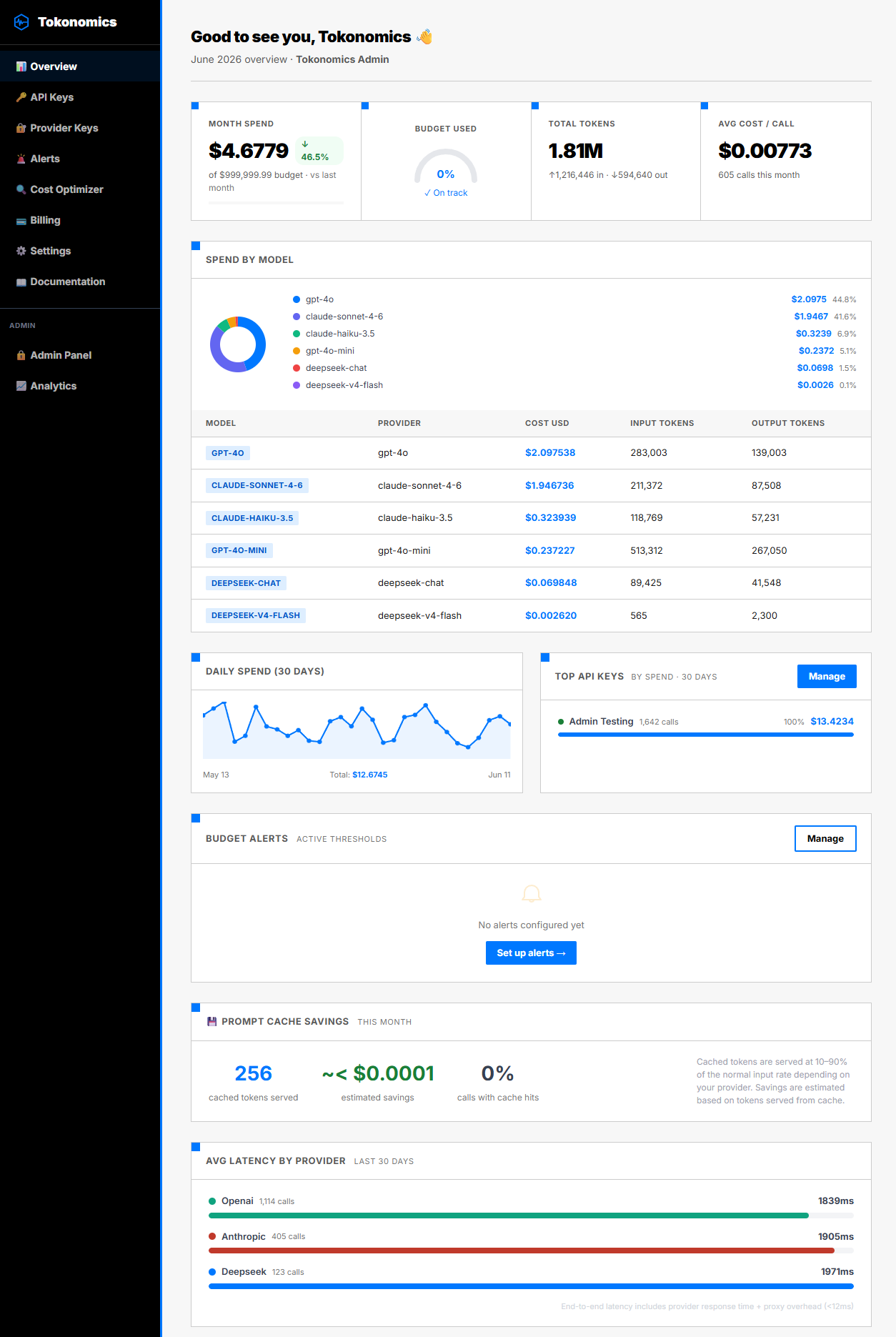
If the call doesn't appear, run through this checklist:
- Confirm the base URL ends with
/proxy/openaior/proxy/anthropic- not just/proxy - Confirm the Authorization header reads
Bearer mk_...with your Tokonomics key, not your provider key - Check for trailing slashes in the URL - they cause routing mismatches
- Look at the raw HTTP response for an error message. The most common issue is specifying the wrong provider segment (
/openaivs/anthropic)
A successful test call confirms the full pipeline: your app - the proxy - the provider - usage recording - dashboard. Once you see that first row, the integration is done.
In internal testing across Python, Node.js, and Go clients, the average latency added by the proxy layer was under 12ms for non-streaming calls and under 8ms for streaming calls. This is consistent with what teams report after integrating: the overhead is imperceptible at the application level.
What Do You Do After Setup?
Once calls appear in your dashboard, you have the baseline. The next steps depend on your team's immediate pain point.
If you need per-feature attribution first, add X-Feature-Name headers to every call site. If you need per-customer billing data, add X-Tenant-ID. If you need hard spending caps - requests blocked at the proxy level when a team or tenant exceeds a budget - that's a Pro plan feature covered in the Hard Spending Caps guide.
The analytics API is available immediately. GET /analytics/summary returns your current month spend, budget used percentage, and model-level breakdown. GET /analytics/by-tag?key=feature returns spend grouped by any tag key. These endpoints work with your Tokonomics API key and are useful for building internal cost dashboards or Slack budget summaries.
Frequently Asked Questions
Does changing the base URL affect my existing error handling or retry logic?
No. The proxy is a transparent pass-through at the HTTP level. Status codes, error response bodies, rate limit headers, and streaming behavior all pass through unchanged. Your existing try/catch blocks, retry decorators, and timeout configurations continue to work exactly as they did before.
Can I use Tokonomics with multiple LLM providers at the same time?
Yes. Each provider has its own proxy path: /proxy/openai, /proxy/anthropic, /proxy/deepseek. Configure each client to point at the relevant path. Tokonomics stores all usage events under your account regardless of provider, so your dashboard shows a unified cost view across all three.
How does Tokonomics handle my existing OpenAI or Anthropic API keys?
Your provider keys stay in your environment. You configure them once in the Tokonomics dashboard. The proxy substitutes them on outbound requests. Your frontend or client-side code only ever sees your Tokonomics mk_ key - which you can rotate or revoke any time without touching provider settings.
Is local development traffic tracked separately from production?
Yes. Pass X-Environment: development on requests from local or staging environments. The dashboard lets you filter by environment so your production cost numbers stay clean. You can also create a separate API key per environment if you prefer account-level separation.
What happens if Tokonomics goes down? Does my app stop working?
You can configure a fallback mode where your app points directly at the provider if the proxy returns a 5xx error. This is a DNS or load balancer configuration on your side - nothing to install. In practice, the proxy runs on redundant infrastructure, but building a fallback is good practice for any critical dependency.
Start Tracking Today
LLM costs are not inherently unpredictable. They're unpredictable when you have no visibility into which feature is calling which model, how often, and with what token volumes. One URL change gives you that visibility. It takes five minutes. The alert you set today could save you from an invoice you'd otherwise only see next month.
If you've read this far, you already understand the cost structure: $2.50 per million tokens for GPT-4o (OpenAI Pricing, 2025), $3 per million for Claude Sonnet (Anthropic Pricing, 2025). These rates compound fast. The teams that catch runaway costs early are the ones who built their monitoring in before the problem appeared - not after.
Create your free account at tokonomics.ca/register and make your first monitored LLM call today.
Questions? Contact us | Documentation
All sources retrieved June 2026.